Wednesday, 3 April 2013

From online store to high street...

Yes I know, everyday you heard news about high street brands going online, selling online. It is always going from offline to online, how about the other way round? Does it even work?

Guess what - MOO.com, an online business cards printer, went offline instead. Their shop is located in Shoreditch, London, in a mall filled with hip brands. Paul Lewis, the director of marketing, says 'We’ve taken our digital service and moved it into the real world. Though sadly we are seeing many brand name shops go under, this does mean that the meaning of the high street is changing for people. It gives opportunities to smaller businesses and startups.'


Moo offline store has replicated the layout of a webpage (you can even see the drop down menus!), which certainly adds the fun factor. (picture from TNW)


Paul Lewis Dir of Marketing Moo Moo takes its online printing emporium to the real world with a new bricks and mortar store in London


moo shop vintage typewriters Moo takes its online printing emporium to the real world with a new bricks and mortar store in London

The store allows customers to choose and design their business card on site. They can also order online and collect in-store. I guess the most interesting part is the 'inspiration' corner, which showcases examples of sticker cards and prints that have chosen the service from Moo. All these allow more interaction between customers and products.Going offline can actually be beneficial to a company since customers can actually touch and feel the product, which can encourage engagement and reinforce brand loyalty.


Indeed, people's shopping habit has changed. Quoting Internet Retailing, We expect the future of retail to be about shops as well as online. But those shops will be ones that are highly-targeted, aimed at a demographic whose interest was first measured online, and offer plenty of added value services'. I cannot agree with this more. There is still plenty of opportunity in the high street, it is just that shoppers are evolving and the high street stores have to evolve with them in order to survive. 
 I guess it is time to redefine the purpose of having a physical store. Shops are not just for displaying and selling products anymore, it should be a part of the multi-channel marketing and selling experience. I am not sure if Moo offline store will work but this can certainly generate a hype and excite potential customers - at least it works on me! Good luck :) 

Tuesday, 2 April 2013

Hello, voucher codes!

People love coupons and vouchers. According to Webinar by Yahoo! Small business, having vouchers/ coupons is one of the 5 must-have features in a Ecommerce platform. However, some retailers may become skeptical of them, since customers are likely to wonder off to other sites to find the voucher code when they see the box for entering the codes. Yes, I have done this as well, and if I cannot find anything I will be screaming 'it is not fair!!' and become a bit reluctant to continue the purchase. Sometimes I even got distracted and forgot to finish the purchase. I am not the only one. According to a study by PayPal and comScore, 27% of online shoppers has abandoned their carts because they 'wanted to look for a coupon'.


At the end of the day, it is about achieving the balance. You want to attract people by having voucher codes, but when customers are already attracted you do not want them to be hunting for the codes. Get Elastics have suggested some useful tips to minimize the damage of voucher code, while still offering them:


1. Exclusive visitors only
Using URL parameter, you can identify a certain group of audience hence you can have your voucher code box available to them only. For instance, only customers which have arrived through a certain link will be able to see the voucher code box. This way you would not be teasing them with the it. Alternatively, you can have the code auto-applied when they click through the link, or you can send them 'pre-discounted' links.


2. Private codes
These codes are sent to selected individuals only and they can only be used once, by the associated email address or account profile. The only concern is people who do not have the code may still be able to see the box and think they are missing out.


3. Obtain data by giving out vouchers
Suggest people to opt into your email list and reward them by a voucher code. When people checkout do not force them to register. Instead, show them that the voucher code is available, and also show them how to get it (by registering). This way you can have more subscribers! Below is an example of getting Facebook likes with giving out discount code.


4. Have you own voucher code page
Just like any other landing page, it is good for SEO purpose. Have the link to your own voucher code page in the checkout and people would not wonder off to find a code somewhere else, which can minimise the chance to abandon the shopping cart. For example, Argos has its own voucher code page:


5. Make it less obvious
Make your box less visible. Make the process of entering the voucher codes more difficult. Only people who have the voucher code will be looking for the box. This can improve the shopping experience of the no-voucher customers - at least they are less likely to see the code box.


Thursday, 28 March 2013

Fixing eBay images to comply with new policies

eBay has changed their policies - it must be a headache for some retailers since all their images need to be redone. According to the new policies, images have to be:

  • Borders, text and logos are are no longer permitted 
  • Watermarks must be small, text only with an opacity of less than 50%, not obscuring the item. 
  • Images must be at least 500 pixels on the longest side but eBay recommends 1600 pixels for the best possible display on all pages and devices. 
  • Ebay also strongly recommends that the item fills 80-90% of the frame and is placed on a plain background.

Instead of flaffing around with Paint, I suggest doing the following... may I present you with a brief tutorial on how to fix your images, complete free. I suggest using a basic programme called pixlr. It is online based, so no installation required: http://pixlr.com/editor/. Now select 'open image from computer' and do the usual uploading... I have randomly picked a picture from an eBay listing to show you...


1. First, have a high resolution image. 
I am sorry if your previous photos have low resolution, but a low pixel picture cannot turn into highly pixel one . So you just have to do it again. As people cannot touch or feel the product they would love to have as much pictorial details as possible. So do not be lazy on this one! And to make things easier, make sure your background is plain. The plainer the easier your job would be. 


2. Crop the image.
Crop out the unwanted part. For this one you dont want the flag and the words. Tab 'c' on your keyboard and hold down your left mouse button and make a rectangle around the area you want.


3. Remove the background. 
Now tab 'w' on your keyboard and you are on magic wand. It selects things for you as a patch (it auto detects the edge of the colour patch). Can you see 'Tolerance' on the top left? The higher the tolerance the less sensitive it is to color difference, hence the larger the patch it will select. So I usually work on something between 20-30 to start with... you have to try it yourself to see how much you want to select. If you think after selecting there are still a lot of black left then you may want to increase tolerance. Vice Versa if you think it is selecting too much. 

now click on the black background, and press 'delete' on your keyboard. Do it on the other part of the black background until you have get rid of them all.


Now we need to tidy up the left over black. Use the eraser (tab 'e' on keyboard). Hold down the mouse button to keep erasing. On the top left you can select the size of the brush. There are hard and soft brushes. Use the hard one for this circumstances (you want hard edges). Erase the rest of the colour. 

Remember to zoom in and look at the edges so you erase them properly. Tab 'z' to zoom. On your right there would be the 'navigation' box which you can zoom in and out. Alternatively, the scroller on your mouse would do the trick too. 

If anything goes wrong, hold down 'Ctrl + z' to go back a step. 


To clean up the edges, try the lazzo tool (tab 'l'). Again on the top left you can select freehand or straight lines. I suggest straight lines since it is rather difficult to control the freehand one. Now you can choose the white part by 'lasso-ing' around them, and press delete. Click the mouse button when you want to anchor the end of the line. Doing this bits by bits would be easier. Again zoom in to get precision. 


4. Remove watermark
This is the most difficult part. You just need a lot of patience. Basically you are painting over the watermark with the brush (tab 'b'). Select a proper size brush first, then hold down 'Ctrl' and click on the colour you want to use. For example if I want to clear the watermark on the light grey patch there, hold down Ctrl and click on the light grey right next to the watermark. Now you have selected the color. Paint onto the watermark to cover it. 


Remember to keep updating the colour of your brush when you move around the picture. Even if the colour looks the same to you it can be slightly different.


5. Adjustment
On the top of the page, you can click on the adjustment tab and there are a lot of things to play around with. Such as lightness (make pictures brighter/ darker), contrast, hue/saturation (adjust colour) etc. Give them a try and maybe your picture will look even better!


This is very basic editing and of course things can be easier if you have Photoshop. At the end of the day this is free and the more you work on it the better you would be on this - and the faster you would get it done. I personally think this is better than Paint so just give it a go :)

Hope this helps.


Tuesday, 26 March 2013

Improve conversion rate by product reviews!

I was doing some reading yesterday and I realise almost every single piece of article suggest putting product reviews onto your online store. According to PowerReviews, increasing review count from 0 to 1 can boost conversion rate by a whopping 20%. I doubt the accuracy of the figure but no matter what the truth is, putting the reviews on is definitely beneficial to your business! So why not try out the following:

1. Reward the reviews
Remember people are lazy. Unless they want to complain about something the majority would not be bothered to write a review for your products. You can have a look at tripadvisor, a lot of excellent hotels still get quite a few negative comments. If you want more positive reviews,  try to offer your customers a reward and they will be more willing to do you the favour. A good example is WeLoveLenses, once they have dispatched your goods they would send you an email, saying 'review our service and get a gift with your next purchase'. This gives people a good incentive to say something positive about you.


2. Use/ partner up with an external review system
There are many reasons behind this. First of all it allows customers to see you when they do comparisons on the external website. Secondly it boosts SEO. Thirdly it looks less biased and more trustworthy! It is free advertising on a third party website so why not? WeLoveLenses have also partnered up with Trustpilot to do the review system.


3. Staff reviews
Employ people to write reviews for your product. This can be risky since it may sounds like a sales pitch! First of all, make sure the staffs have actually tried the products themselves. Secondly, do not use technical, informative product knowledge in the reviews - it would just look like product description. Describe the experience instead and make sure you mention the USP. Thirdly, do not be afraid to talk about the negative side of the products as well. Of course, your positive positive points have to be really good to overcome the single, minor, negative point.


Reviews can give customers a non-marketer opinion of the products and give them reassurance to make a purchase from you. According to GetElastic, break the ice with the first review and you could let customers pick up the slack. This article gives you ideas on how to attract more customer reviews: http://www.getelastic.com/5-ways-to-attract-more-customer-reviews/

Monday, 25 March 2013

Selling on Amazon - get the clicks!

While users can browse for items using the categories on the left-hand side of the page, the search bar remains the primary method for locating products. As such, it is important to make sure product details are optimised for search.

Amazon’s search function harvests keywords from the product title, standard product ID (UPC, EAN, ISBN), brand/designer, manufacturer and search terms.

1. Product titles

Burnham said that product titles should use all the space available and be full of keywords, while also maintaining a customer-friendly structure. It is important to avoid punctuation, asterisks, caps or special characters as users won’t include these in search terms.
Similarly, customers won’t all use the same keywords, so merchants should vary their product titles and experiment to see what works.


2. Search terms
Amazon allows merchants to include five additional search terms for each product.
Burnham said it is important to use all five, highlighting a Nokia smartphone that appeared fourth in a search for ‘Nokia phone’, but top for ‘Nokia phone with Bluetooth’. The boost in rankings was down to the fact that the merchant had used included the search term ‘Bluetooth’ in the product details.
To optimise the additional search terms, avoid using any words that appear in the product title.
Don’t repeat the title, product name or brand, it’s a waste of search terms.

3. Search Index
Amazon’s search index takes into account price, availability and sales history, but the better selling products will generally rise to the top. However, Burnham pointed out that Amazon occasionally shuffles search results to more evenly promote products. 


4. Browse Nodes

These are essentially product codes that identify your items within the product categories. Merchants can select two for each product.
Again, it is about giving Amazon as much information as possible in order to increase your visibility in the marketplace.


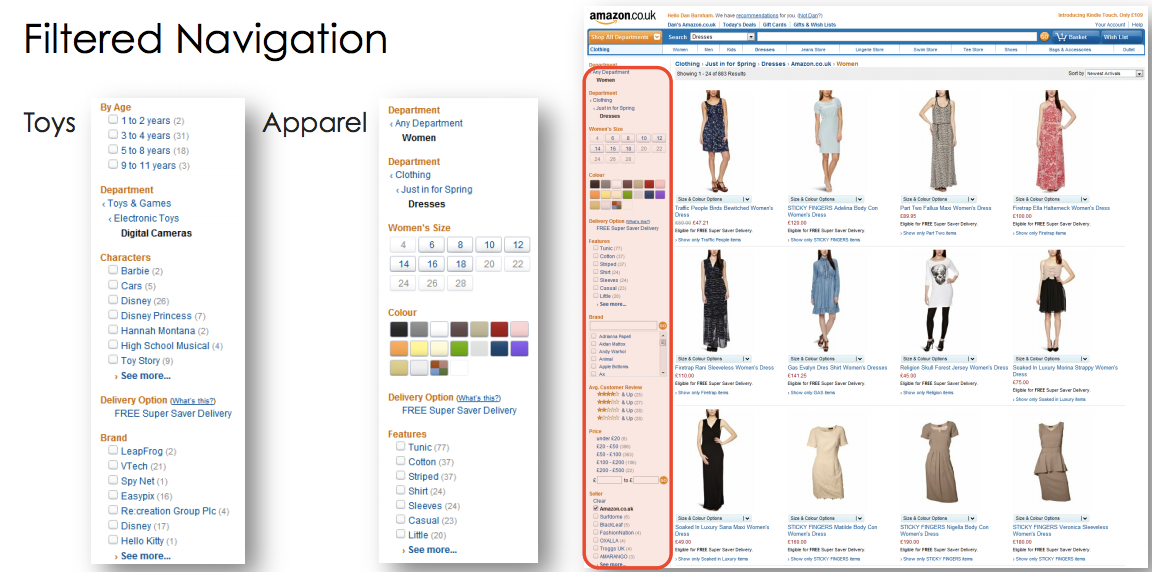
5. Filtered Navigation

This allows merchants to include detailed product criteria, such as the size and colour of each item.
Users can then filter their product search to find more relevant items. Iit is very important for sellers to include the detailed information in their product listings otherwise they won’t appear in filtered results. 


6. Product Variation

This tool allows sellers to group different variations (e.g. size or colour) of the same product. Users can then check different items from the same product page.
Burnham said the merchant has to provide an SKU and establish each item’s parentage, but it is a user-friendly way of giving customers access to your full product range.

(source: Econsultancy)

Tuesday, 19 March 2013

5 tips on Online returns handling

Did you know 22% of delivered items are destined to be returned (source: Internet Retailing)? 3P Logistics have handled much returns and we understand that this could be a headache for retailers. On the bright side, we can use this opportunity to impress customers by offering exceptional services. ASOS is a good example of retailer which has a high customer retention rate, and one reason behind their success is their fuss free return policy. So what can we learn from them? 


1. Display your returns policy clearly

This should be displayed throughout the whole shopping experience, including before and after purchase. ASOS has put its return information on every single item page. This can offer them reassurance, which is extremely helpful when they are not 100% sure about the purchase. The link leads to the policy page which has demonstrated absolute transparency and has included every single detail, giving customers a peace of mind. 


2. Be nice! 

ASOS' returns policy starts with the line 'Do you want to return something? No problem!', which gives a positive and friendly initial image.Most importantly, ASOS offers free returns. Think about it, customers would have to pack and take the product to the post office already for a return, why would they want to be paying as well? Of course free returns would cost you more, but this will help retaining customers and boosting extra conversion in the future (Econsultancy). According to Zappos, 'people who regularly return items can be some of your best customers'. 


3. Show great images, videos, with detail product description
Since customers cannot actually see or touch the products, they may have their own version and interpretation of the product in their head. Once it has arrived and they find out it is not what they expected they will return it. To minimize return rate, clearly displaying your products is the key. Make sure pictures are as 'real' as possible, with high resolution so people can zoom in to look into the details. Not only does ASOS offer catwalk video and multiple images taken from different angles, it has also listed all the measurements, materials and even product care information for every single item. This way customers can get as much information as possible and they would have a clearer idea of the product, hence less returns. 


4. Send return document with your product
ASOS has always included return information, forms and labels in the packages. This makes things much easier for your customers and with the address pre-printed, less mistakes would be made in the return process. The return form should also be asking for feedbacks so you can uncover problems or trends. 


5. Inform your customers
Don't worry - your customer would not be annoyed. The more information they receive about the return process the merrier. Send them an email when you have received the product, send them another email when the replacement is dispatched or a refund has been issued. Just keep them updated. I am sure they will appreciate the effort!